Image组件
该组件是Next.js内置的图片组件,是基于原生img标签进行扩展,并不代表原生img标签不能使用。
- 尺寸优化:支持使用现代化图片格式,如
webp,avif,apng等,并自动根据设备提供正确的尺寸。 - 视觉稳定性:防止图片加载时发生布局偏移,具体参考CLS
- 懒加载:在图片进入视口才会加载,使用浏览器原生懒加载,并可选择添加模糊显示占位符。
- 灵活性:可按需调整图像大小,即使是存储在远程服务器上的图像也可以调整。
图片引入
1. src本地图片引入
Next.js建议我们把图片放在根目录下的public文件夹中,然后使用/开头访问。

import Image from "next/image"
export default function Home() {
    return (
        <div>
            <h1>Home</h1>
            <Image
                src="/1.png"
                width={100}
                height={100}
                alt="1"
            />
        </div>
    )
}
2. import静态引入
使用import引入图片,是不需要填写宽度和高度,Next.js会自动确定图片的尺寸。
{
    "compilerOptions": {
        "paths": {
            "@/*": ["./src/*"],
            "@/public/*": ["./public/*"] // 新增这一行代码,配置图片路径。
        }
    }
}使用静态import引入图片,你会发现无需填写宽度和高度,Next.js会自动确定图片的尺寸。
import Image from "next/image"
import test from '@/public/1.png'
export default function Home() {
    return (
        <div>
            <h1>Home</h1>
            <Image
                src={test}
                alt="1"
            />
        </div>
    )
}
3. 远程图片引入
import Image from "next/image"
export default async function Home() {
    const len = 20;
    return (
        <div>
            <h1>Home</h1>
            {Array.from({ length: len }).map((_, index) => (
                <Image
                    key={index}
                    src={`https://eo-img.521799.xyz/i/pc/img${index + 1}.webp`}
                    alt="1"
                    width={192}
                    height={108}
                />
            ))}
        </div>
    )
}当我们直接使用远程图片引入的时候Next.js会报错,因为Next.js默认只允许加载本地图片,如果需要加载远程图片,需要配置next.config.js文件。
image-loader.ts Uncaught Error: Invalid src prop (https://eo-img.521799.xyz/i/pc/img1.webp) on next/image, hostname “eo-img.521799.xyz” is not configured under images in your next.config.js

import type { NextConfig } from "next";

const nextConfig: NextConfig = {
  /* config options here */
  images: {
    remotePatterns: [
      {
        protocol: 'https', // 协议
        hostname: 'eo-img.521799.xyz', // 主机名
        pathname: '/i/pc/**', // 路径
        port: '', // 端口
      },
    ],
  },
};
4. LCP警告
如果图片是首屏或者LCP图片,需要添加loading="eager"属性,否则会触发LCP警告,因为Image组件默认是懒加载的。
- lazy: 懒加载,默认值,在图片进入视口才会加载。
- eager: 立即加载,在图片进入视口就会加载。
Image with src “https://eo-img.521799.xyz/i/pc/img1.webp” was detected as the Largest Contentful Paint (LCP). Please add the loading="eager" property if this image is above the fold.
Read more: https://nextjs.org/docs/app/api-reference/components/image#loading
import Image from "next/image"
export default async function Home() {
    const len = 20
    return (
        <div>
            <h1>Home</h1>
            {Array.from({ length: len }).map((_, index) => (
                <Image
                    key={index}
                    src={`https://eo-img.521799.xyz/i/pc/img${index + 1}.webp`}
                    alt="1"
                    width={192}
                    height={108}
                    loading="eager" // 立即加载
                />
            ))}
        </div>
    )
}第二种解决方案使用preload属性加载图片,表示提前预加载图片,不过Next.js还是更加推荐使用loading="eager"属性加载图片。
import Image from "next/image"
export default async function Home() {
    const len = 20
    return (
        <div>
            <h1>Home</h1>
            {Array.from({ length: len }).map((_, index) => (
                <Image
                    key={index}
                    src={`https://eo-img.521799.xyz/i/pc/img${index + 1}.webp`}
                    alt="1"
                    width={192}
                    height={108}
                    preload={index < 10} // 优先加载策略
                />
            ))}
        </div>
    )
}
5. 图片格式优化
Next.js 会通过请求Accept头自动检测浏览器支持的图像格式,以确定最佳输出格式
Accept:image/avif,image/webp,image/apng,image/svg+xml,image/*,*/*;q=0.8我们可以同时启用 AVIF 和 WebP 格式。对于支持 AVIF 的浏览器,系统将优先使用 AVIF 格式,WebP 格式作为备选方案。目前AVIF格式最优。
const nextConfig: NextConfig = {
  /* config options here */
  images: {
    formats: ['image/avif', 'image/webp'], //默认是 ['image/webp']
  },
};
6. 设备适配
如果你的老板告诉你要兼容哪些设备,你可以使用deviceSizes和imageSizes属性来配置。
const nextConfig: NextConfig = {
  /* config options here */
  images: {
    deviceSizes: [640, 750, 828, 1080, 1200, 1920, 2048, 3840], // 设备尺寸
    imageSizes: [16, 32, 48, 64, 96, 128, 256, 384], // 图片尺寸
  },
};这两个属性结合会最终生成一个srcset属性,用于浏览器选择最佳图片。
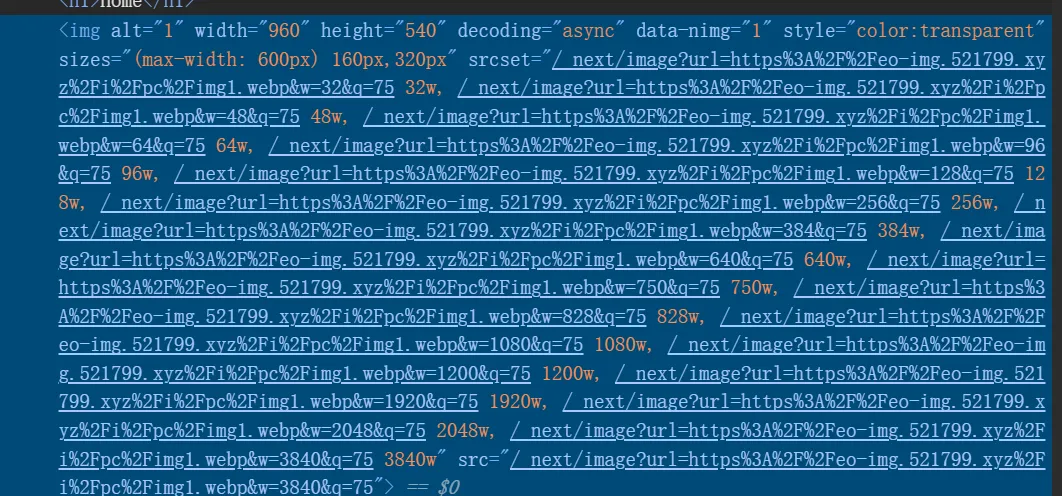 那为什么需要两个数组去实现呢?
我们观察上图可以发现,imageSizes用于生成小图片尺寸例如(缩略图,头像等),而deviceSizes用于生成大图片尺寸例如(横幅图、背景图、全屏展示图)。
import Image from "next/image"

// 头像 - 固定 64px
export function Avatar() {
  return (
    <Image
      src="/avatar.jpg"
      width={64}
      height={64}
      alt="用户头像"
      sizes="64px"  // ← 告诉浏览器这张图只需要 64px
    />
  )
}

// 横幅图 - 响应式全宽
export function Banner() {
  return (
    <Image
      src="/banner.jpg"
      width={1920}
      height={600}
      alt="横幅"
      sizes="100vw"  // ← 占满整个视口宽度,使用 deviceSizes
    />
  )
}

// 响应式内容图
export function ContentImage() {
  return (
    <Image
      src="/content.jpg"
      width={1200}
      height={800}
      alt="内容图"
      sizes="(max-width: 768px) 100vw, (max-width: 1200px) 50vw, 1200px"
      // ↑ 手机上 100% 宽度,平板上 50%,桌面最大 1200px
    />
  )
}
Props
以下是 Image 组件可用的属性:
必需属性
| 属性 | 类型 | 示例 | 说明 |
|---|---|---|---|
| src | String | src="/profile.png" | 图片源路径,支持本地路径或远程 URL |
| alt | String | alt="Picture of the author" | 图片替代文本,用于无障碍访问和 SEO |
尺寸相关
| 属性 | 类型 | 示例 | 说明 |
|---|---|---|---|
| width | Integer (px) | width={500} | 图片宽度,静态导入时可选 |
| height | Integer (px) | height={500} | 图片高度,静态导入时可选 |
| fill | Boolean | fill={true} | 填充父容器,替代 width 和 height |
| sizes | String | sizes="(max-width: 768px) 100vw" | 响应式图片尺寸 |
优化相关
| 属性 | 类型 | 示例 | 说明 |
|---|---|---|---|
| quality | Integer (1-100) | quality={80} | 图片压缩质量,默认为 75 |
| loader | Function | loader={imageLoader} | 自定义图片加载器函数 |
| unoptimized | Boolean | unoptimized={true} | 禁用图片优化,使用原图 |
加载相关
| 属性 | 类型 | 示例 | 说明 |
|---|---|---|---|
| loading | String | loading="lazy" | 加载策略,“lazy” 或 “eager” |
| preload | Boolean | preload={true} | 是否预加载,用于 LCP 元素 |
| placeholder | String | placeholder="blur" | 占位符类型,“blur” 或 “empty” |
| blurDataURL | String | blurDataURL="data:image/jpeg..." | 模糊占位符的 Data URL |
事件回调
| 属性 | 类型 | 示例 | 说明 |
|---|---|---|---|
| onLoad | Function | onLoad={e => done()} | 图片加载完成时的回调 |
| onError | Function | onError={e => fail()} | 图片加载失败时的回调 |
其他属性
| 属性 | 类型 | 示例 | 说明 |
|---|---|---|---|
| style | Object | style={{objectFit: "contain"}} | 内联样式对象 |
| overrideSrc | String | overrideSrc="/seo.png" | 覆盖 src,用于 SEO 优化 |
| decoding | String | decoding="async" | 解码方式,“async”/“sync”/“auto” |